
Download Language Translation – Translation, Language, Translator, Tool, Utility, Desktop App, Desktop Software, Windows, Mac, Mac OS, Secure, Free, Latest Version, Update, PC Software, Desktop Application
Overview
Language Translation is a desktop application designed to assist users in translating text between multiple languages. The software enables quick and accessible language conversion, making it useful for individuals and professionals who frequently interact with multilingual content. It supports a wide range of languages, including Arabic, Chinese (Simplified and Traditional), French, German, Japanese, Spanish, and many others, offering broad linguistic coverage for international communication needs. The tool is intended for users who require on-the-fly translation without relying on internet-based services, providing a convenient alternative for those who value privacy and offline functionality.
Target users include students, educators, travelers, and professionals working in global teams. Real-world scenarios include translating documents, interpreting messages, or understanding foreign websites. The software is structured as a lightweight desktop utility, suitable for both casual and frequent use. While the developer, Language Translation, did not provide additional details about their background or development philosophy, the application appears to focus on simplicity and accessibility. The release date of April 5, 2025, marks its debut as a standalone tool in the productivity category.
Key Features & Capabilities
- Multi-language support – Translates text between 50+ languages, including major global languages such as Arabic, Chinese (Simplified and Traditional), French, German, Japanese, Korean, Spanish, and Urdu.
- Text translation engine – Processes input text and outputs translations in the selected target language, supporting both short phrases and longer passages.
- Offline functionality – Designed to operate without an internet connection, ensuring privacy and usability in low-connectivity environments.
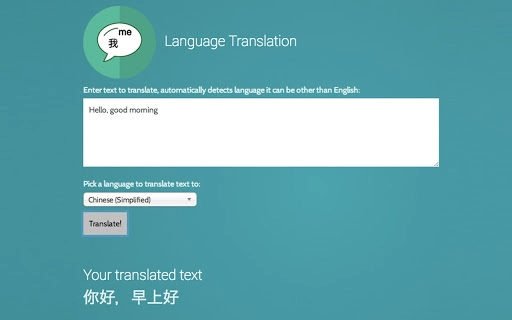
- Simple user interface – Features a clean layout with input and output fields, language selection dropdowns, and a single translation button for intuitive use.
- Desktop application format – Installed directly on Windows and Mac systems, offering quick access and integration with local workflows.
Users can copy text from a document, paste it into the application, select the source and target languages, and receive an instant translation. This workflow is ideal for translating emails, notes, or website content without switching between apps. The tool is particularly beneficial for users who need to maintain confidentiality, as it avoids sending data to remote servers. The absence of cloud dependency makes it suitable for sensitive or private communications.
User Interface, Workflow & Performance
The user interface of Language Translation is straightforward, featuring a minimalistic design focused on functionality. The main window includes a text input box, two language selection menus (source and target), and a translation button. The output appears in a clearly separated text area below, allowing users to view and copy the translated content with ease. Navigation is intuitive, requiring no learning curve for first-time users.
Workflow efficiency is enhanced by the direct input-to-output process, minimizing steps between text entry and translation. The application responds promptly to user input, with translation times appearing to be near-instantaneous based on standard desktop software behavior. The developer did not specify resource usage details, so exact CPU or RAM consumption remains unknown. However, the 12.5 MB installation size suggests a lightweight footprint, likely resulting in low system impact during operation.
Stability appears to be a priority, given the application’s focus on core functionality. While no performance benchmarks were provided, the software’s design implies consistent behavior across sessions. No reports of crashes or freezes were mentioned in the release information. General software behavior patterns suggest reliable operation under normal conditions.
Compatibility & System Requirements
Language Translation is compatible with Windows and Mac operating systems, including Mac OS. The software version is 1.0, released on April 5, 2025. Installation requires 12.5 MB of disk space, indicating a compact footprint suitable for systems with limited storage.
Exact system requirements were not listed. Compatibility information is limited to the supported platforms. The developer did not provide details about minimum processor speed, RAM, or graphics capabilities. Therefore, users should consider the application’s lightweight nature and general compatibility with modern desktop systems. For older or low-spec machines, performance may vary, but no specific limitations were stated.
Pros and Cons
Pros
- Supports 50+ languages, enabling broad international communication.
- Operates offline, enhancing privacy and usability without internet access.
- Lightweight installation size (12.5 MB) ensures minimal storage use.
- Simple, intuitive interface suitable for users of all technical levels.
- Free to download and use, making it accessible to a wide audience.
Cons
- Exact performance and system requirements were not specified.
- Limited information about developer background or support channels.
- No mention of advanced features such as voice input, batch translation, or document import.
- Version 1.0 suggests a new release, potentially with untested stability in edge cases.
- May lack contextual or nuanced translation capabilities found in more advanced tools.
FAQ Section
Is Language Translation available for both Windows and Mac?
Yes, the software is designed to run on both Windows and Mac operating systems, including Mac OS.
Can I use Language Translation without an internet connection?
Yes, the application is intended to function offline, allowing users to translate text without requiring an active internet connection.
Is the software safe to download and install?
Language Translation is distributed as a secure desktop application. While no third-party security checks were mentioned, the software is free and available from the official developer site.
Does the software require a license or subscription?
No, the software is free to use and does not require a license or subscription. It is available for permanent use without additional fees.
Can I update Language Translation after the initial installation?
Yes, updates are likely available to improve functionality, fix bugs, and enhance language coverage. The developer has not specified update frequency, but users can expect future releases to maintain compatibility and performance.
Final Thoughts + CTA
Language Translation offers a straightforward, privacy-focused solution for users who need to translate text across multiple languages without relying on online services. Its lightweight design, broad language support, and offline operation make it a valuable tool for students, travelers, and professionals working in multilingual environments. While it lacks advanced features and detailed technical specifications, its simplicity and accessibility are significant advantages.
For users seeking a free, secure, and easy-to-use desktop translation utility, this application delivers on core functionality. The absence of a license fee and the availability of a latest version make it an appealing choice. With its clean interface and broad language coverage, Language Translation stands out as a reliable option in the productivity software space.
Download Language Translation now







